
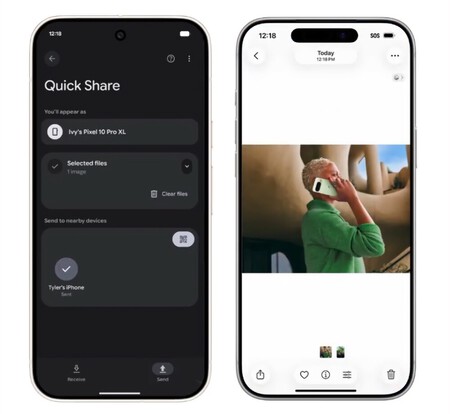
How to Send Files from Android to iPhone Using Quick Share
Sending files from an Android device to an iPhone has become increasingly seamless with the introduction of Quick Share’s compatibility with Apple’s AirDrop. Previously, sharing files between these two ecosystems was challenging due to differing standards, but Google’s recent efforts aim to simplify this process.
Understanding Quick Share and AirDrop
Quick Share is Android’s feature designed for sharing files between Android devices or even between Android and Windows systems. On the other hand, AirDrop serves a similar purpose for Apple devices. With Google’s latest update, these two functionalities are now becoming compatible, allowing users to share files back and forth easily.
The initial rollout of this feature is primarily for the Google Pixel 10, but there are plans to expand it to other Android devices in the near future.
Steps to Send Files from Android to iPhone
To start using Quick Share to send files to an iPhone, you’ll first need to ensure that you have a Google Pixel 10 and that it’s running the latest version of the software. Google has released an update for the Google Play System to facilitate this functionality, and it’s expected to be available for all users gradually.
Activating Quick Share
Once you have the feature activated on your Pixel 10, follow these steps:
- Open the quick settings menu on your Android device.
- Select the Quick Share option.
- Choose the file you want to share from your galleries or documents.
Selecting Nearby Devices
After selecting Quick Share, a list of nearby devices will populate on your screen. Among these devices, you’ll now see nearby iPhones. Tap on the corresponding iPhone to initiate the transfer.
Receiving Files on the iPhone
For the iPhone user to successfully receive the file, there are specific settings that must be configured:
- Go to the iPhone’s Settings.
- Navigate to AirDrop and change the settings to allow files to be received from “Everyone for 10 minutes.”
This setting ensures that your file transfer can go through, but it’s essential that the iPhone owner is aware and ready to accept the incoming file via Quick Share.
Conclusion
The compatibility between Android’s Quick Share and Apple’s AirDrop marks a significant advancement in cross-platform file sharing. While currently limited to the Pixel 10, this feature’s expansion to other Android devices will undoubtedly enhance user experience, allowing for more flexible and efficient file sharing.
So, whether you’re sending photos, documents, or videos, you can now do so effortlessly from your Android device to an iPhone, bridging the gap between these two popular mobile ecosystems.