
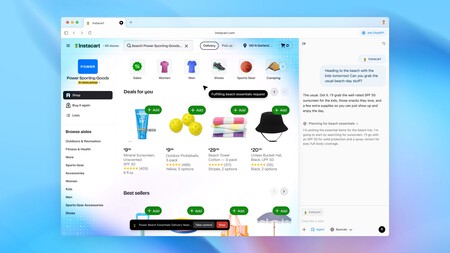
As the technological landscape evolves, a new player is making waves in the digital realm: ChatGPT Atlas. With its introduction, OpenAI aims to redefine the way we access and interact with information, blending the conversational experience of ChatGPT with a web browser . This release comes in the wake of changing dynamics in online search, where traditional giants like Google now face competition from advanced AI systems. With ChatGPT Atlas, OpenAI is taking a decisive step towards integrating AI into our everyday browsing habits.
The potential of this browser is vast. While Perplexity’s Comet has already set a precedent with an AI-integrated browser, OpenAI’s offering seeks to carve its niche by sustaining user expectations through a seamlessly integrated experience. Will it succeed? Only time will tell.
What is the OpenAI Browser Like?
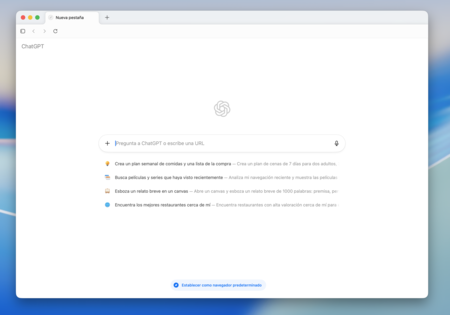
Upon launching ChatGPT Atlas, users are greeted with a familiar interface strikingly similar to that of ChatGPT itself. The design is intentional, facilitating a smooth transition from chat interface to browser with a focus on maintaining a conversational tone throughout the browsing experience. Echoing its predecessor’s elegance, Atlas embraces simplicity while maximizing functionality.
Interestingly, OpenAI has yet to confirm the exact engine that powers Atlas. Upon inspection using What’s My Browser, Atlas identifies as running on Chromium 141, a clear indication it shares the same foundation as Google Chrome. While an official announcement is still awaited, this information adds weight to initial assessments of the platform.
ChatGPT Atlas retains the essential features of any web browser, including history , bookmarks , and tabs . However, its standout feature lies in its innovative interaction capabilities. By using natural language—either through text or voice—users can easily navigate the browser, locate recent pages, or even search their browsing history for specific terms with minimal effort.
What sets Atlas apart, however, are its agentic capabilities . A button labeled “Ask ChatGPT” located in the upper right corner allows users to activate agent mode, enabling them to delegate tasks to the AI. This could mean opening new tabs, switching between various sites, or executing simple functions. However, it’s crucial to note its limitations : users are unable to execute code, download files, or access other applications directly through the browser.
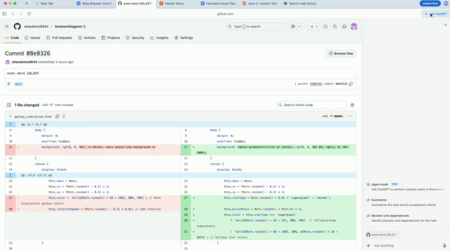
Additionally, ChatGPT Atlas integrates previous OpenAI products to enhance user experience. Personalized suggestions appear on the home screen based on recent activities, channeling user data into pragmatic features. The overarching goal is transparent: unify conversation , search , and assistance into a cohesive operating environment.
Using ChatGPT Atlas for the First Time
To experience the capabilities of ChatGPT Atlas firsthand, users must initiate the download process. Currently, it is available exclusively for macOS , with plans for Windows , iOS , and Android versions to follow “soon.” Mac users can easily acquire it from [chatgpt.com/atlas](https://chatgpt.com/atlas). Once you download the application, simply drag the ChatGPT Atlas icon into your applications folder.
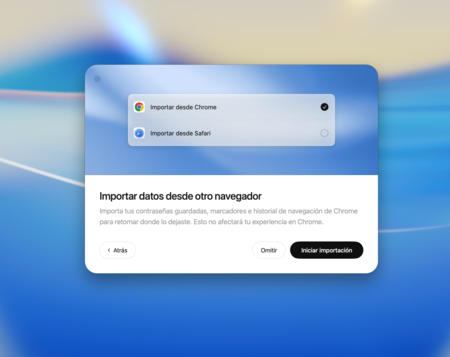
Upon your first login into ChatGPT Atlas, you’ll be prompted to sign in with your OpenAI account. Subsequent steps allow you to import data from existing browsers, including passwords , bookmarks , or browsing history. The app also allows users to choose whether to enable its memory functionality, giving them control over how much browsing detail is retained.
European users can rejoice at the fact that ChatGPT Atlas will be available within the European Union from day one. Access requirements remain minimal, as there’s no need for a payment account or subscription to the Pro plan to use the browser. This contrasts sharply with many other AI products that initially limit access to subscribers before a wider rollout.

That said, not all features are available universally. The agent mode, for example, is exclusively for ChatGPT Plus, Pro, and Business users, illustrating OpenAI’s strategic focus to transform Atlas into the primary browser for early adopters. By designating it as the default browser, users can unlock extended limits on messages, file uploads, data analysis, and image generation for a promotional period of seven days.
In a world where technology continues to reshape our digital interactions, the launch of ChatGPT Atlas might mark a pivotal point in navigating information online. The integration of artificial intelligence into everyday tools like web browsers promises not just convenience, but a transformative approach to how we perceive and utilize the vast resources available on the internet.