
End of Support for Windows 10: What It Means for Users
On October 14, millions of computers worldwide will be rendered vulnerable as the official support period for Windows 10 comes to an end. This landmark shift implies that users of devices reliant on this operating system will no longer receive crucial security updates, putting their data at risk.
Problematic Situation. This scenario poses a significant dilemma not just for individual users but particularly for businesses that depend on the reliable operation of their systems. The closure of security updates opens the door to future vulnerabilities, which may lead to potential breaches. Historically, this has occurred with outdated Microsoft operating systems; however, the magnitude of the issue is far greater with Windows 10.
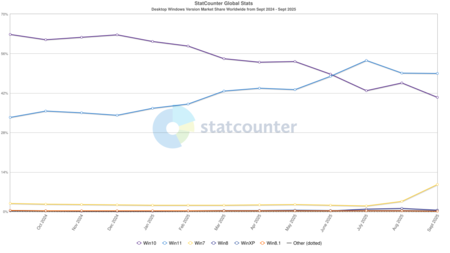
Current Statistics. According to data from Statcounter Globalstats, as of now, Windows 10 holds a global market share of 40.84%. This translates to roughly four out of ten devices using Windows being exposed to unpatched vulnerabilities starting mid-October. In countries like Spain, the situation is even more precarious, with the percentage of Windows 10 users being alarmingly high.
Lessons from the Past: Windows 8. The end of support for Windows 8 in January 2016 serves as a warning. At that time, the market share of Windows 8 was significantly lower, which made the risk more manageable. However, the volume of ransomware attacks and other malware threats has surged since then, making the ending of support for Windows 10 far more dangerous.
A Field Day for Cybercriminals. With the cessation of updates, cybercriminals are presented with a golden opportunity to uncover and exploit weaknesses in Windows 10. While Microsoft may provide interim solutions to extend support for certain users, history suggests that many will not take advantage of these options, thus leaving their systems susceptible to future threats.
Available Update Options. Fortunately, users have several options post-October 14. One option is to upgrade to Windows 11 while bypassing technical requirements set forth by Microsoft. Another possibility involves taking advantage of the free extension of the update period, which, if utilized correctly, could provide another year of security. Alternatively, users may consider investing in new PCs that come pre-installed with Windows 11. There’s also the choice to explore other operating systems such as various Linux distributions, which can keep older hardware functional and secure.
Concerns Over “Legacy” Systems. Microsoft’s longstanding policy of maintaining backward compatibility offers the advantage of running older software on modern hardware. However, it comes with the significant downside of exposing users to potential security risks. As systems age without updates, they become targets for cyber threats.
Comparative Analysis: Apple vs. Microsoft. Apple’s approach to system updates is notably different and more aggressive. While users can technically continue utilizing older versions of macOS, new features and security enhancements are generally unavailable on outdated hardware. This strategy fosters a quicker transition to newer, more secure software.
Apple’s Simplified Update Path. The situation is further simplified for Apple due to their limited number of devices; they do not license their operating system, rendering the update process much more manageable. In contrast, the Windows ecosystem is vast, comprising countless manufacturers and hardware combinations which can lead to various conflicts, making security management far more complex.
Given the approaching end of Windows 10 support and its profound implications, it is essential for users and organizations to act swiftly to mitigate risks. The evolving landscape of cybersecurity demands proactive measures to ensure the safety of digital environments.