

Let’s explore how to create educational games using artificial intelligence, allowing you to start gamifying learning within seconds and just a prompt. Learning through play is an excellent way to review material and ensure that young learners pay more attention during the game, adding an extra layer of fun.
We will begin this article with a list of tips and things to consider before you start. Then, we’ll outline two methods for creating games using AI assistants like ChatGPT, Copilot, Gemini, and Claude. Finally, we will provide a list of other platforms for creating educational games that utilize AI and guide you on how to use two of them.
Before You Start: Key Considerations
Before diving into creating your educational games, there are several factors to keep in mind. First and foremost, it’s essential to define the learning objective. Think about what competence or theme you’ll be focusing on and how you plan to handle it—whether through methods to reinforce memory or to apply knowledge.
Next, it’s crucial to define the context and target audience, determining the age or grade level, the amount of time available for playing, and the devices that will be used. Consider if you want the games to be individual or group activities as well.
Once you have these aspects clear, it’s time to choose the type of game you want to create. Options include quiz questions, competitive trivia, and other game types. Remember, we have mentioned how to create games like Wheel of Fortune and Pasapalabra using artificial intelligence, which can be adapted for educational purposes.
When creating the game, consider the scoring system—whether it’s only for correct answers or also factoring in speed. Think about whether you want to allow retries for mistakes.
Don’t forget to test the games before using them with children or teens, and review the questions and answers. AI can make mistakes and have hallucinations, potentially resulting in faulty games or nonsensical questions or answers.
Finally, avoid adding personal data or private information of any students or users. Everything written could end up on the servers of the AI provider, and maintaining privacy is paramount.
Create Games Easily with AI

The first method involves using an AI assistant like ChatGPT, Copilot, Gemini, or similar platforms that can generate code to create the game. You will only need to provide a prompt explaining to the AI that you want to generate a game in a programming language like HTML.
The advantage of generating code in a straightforward language like HTML is that there are fewer chances of the AI making mistakes, and you only need to copy and paste it to run it in any browser without needing an internet connection. Visually, it will be quite simple, but for practical purposes, it’s more than sufficient.
You can use a prompt like the following:
“I want you to create HTML code for a quiz game with 20 questions about the history of music for primary school children. Each question should have four answers, and only one of them should be correct. Each correct answer on the first try will earn 100 points. If the first answer is wrong, there’s a second chance, earning 50 points for a correct second answer, with a pass to the next question if both are wrong. The game should proceed question by question, with two teams of 20 questions each.”
As you can see, once you specify that you want HTML code for a game, you just need to describe the game you want while mentioning the age of the students who will participate and the theme you’d like to include.
Then, simply describe the mechanics of the game. In this case, I’ve outlined that it’s for two players or teams, mentioned the two opportunities per question, and specified the points awarded for correct answers. I defined everything, and then ChatGPT generated the code.
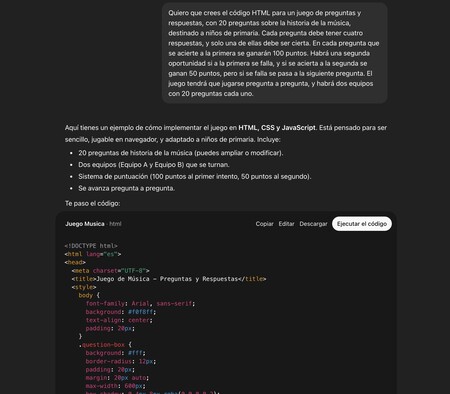
When the AI generates the code, you will have a button to launch and test it, allowing you to play and verify if everything is correct. Here, you could also add your own questions in a list or include specific questions and answers. It’s advisable to take your time and use a text editor to compose the entire prompt, and then copy and paste it into the AI.
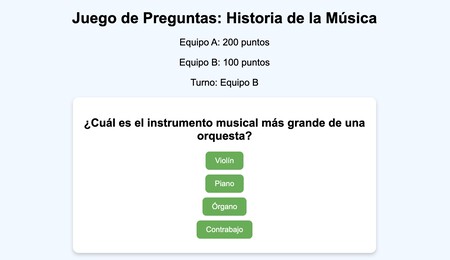
With this method, you can create any type of game that comes to mind, any educational game, even if it’s an invention. You’ll just need to ensure that you meticulously describe all mechanics, the options available, scoring, and any buttons you want included.

Let AI Be the Host in a Game
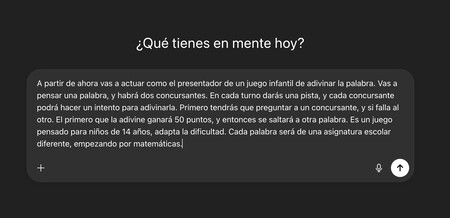
If programming a game, even for direct use with AI, feels too complicated, you can simplify the process even further. You can ask your AI assistant to act as the host for a specific game, presenting the relevant questions to the kids.
For this, just keep one thing in mind: the entire game must be conducted in a single chat window. As you know, AIs like Gemini, ChatGPT, or Copilot have interactions divided into different chats, starting over each time a new one is opened. In one chat, you’ll instruct it to conduct the desired game, and all interactions must take place there. If you need to ask the AI another question, do so in a separate chat, keeping the game chat clean.
For example, you can use this prompt for a word-guessing game:
From now on, you will act as the host of a children’s guessing game. You will think of a word, and there will be two contestants. In each turn, you’ll give a clue, and each contestant can attempt to guess it. First, you will ask one contestant, and if they guess wrong, you’ll ask the other. The first to guess correctly will earn 50 points and move on to the next word. This game is intended for 14-year-olds, so please adapt the difficulty level. Each word will come from a different school subject, starting with math.
Here, you can modify the prompt to suit the game you want to create, but when doing so, there are several points to consider. First, you should begin your prompt with “From now on” to signal to the AI that everything written from that point forward is part of the game.
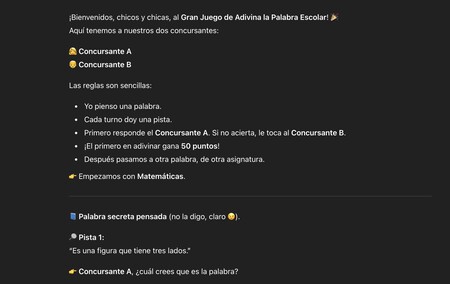
Secondly, you must thoroughly describe the mechanics of the game, from the participating teams to what happens in each turn, the types of questions, etc. Detail is crucial because in initial testing, I neglected to specify that first one contestant should be asked followed by the other, which led to both being questioned simultaneously, lacking coherence.
It’s also essential to specify the subjects and age of the contestants. Subjects can be tailored to revolve around guessing words or asking questions about classroom topics, and you may use generic subjects or specify detailed themes. Likewise, the contestants’ age is vital for adapting the difficulty level.
In this method, the game is conducted by typing your responses directly to the AI in the chat, making it relatively straightforward. However, there are limitations as it will have to involve guessing phrases or words, performing calculations, or things that can be written directly. You can also create a type of conversational adventure or escape room, adding plot elements for dynamic and immersive gameplay.

Other Services for Creating Games with AI
In addition to AI assistants like ChatGPT, there are other services you can utilize to create educational games and leverage AI features. Here’s a list of some of the best options, all with free versions for you to test out.
- Wayground: This is an educational platform designed for teachers, allowing them to create lessons, quizzes, and study plans while using game modes to gamify learning. It also has the capability to use AI to generate content and activities. Link: wayground.com.
- Educaplay: Another platform for creating academic games, offering test types, Pasapalabra, memory games, matching, riddles, and more. It also features an AI assistant named Ray to help generate games, although you can use it in a limited capacity with free accounts. Link: es.educaplay.com.
- Kahoot!: Kahoot! is a social and gamified educational service where you can create entirely customized quiz games. Although it has a free account, AI functions are mostly available for paid users. Link: kahoot.com.
- Genially: A site where you can create everything from presentations to escape rooms or quiz games, all designed to make learning more engaging. The platform also offers AI to expedite game creation. Link: genially.com.
- Tinytap: This platform is aimed at creating games for younger audiences, allowing you to pose visual questions and set buttons for selecting the correct answer—activities that engage touch-screen interaction. Its AI will aid you in creating games based on chosen topics. Link: tinytap.com.
- Wordwall: One of the largest platforms for educational games, offering templates for contests, roulette games, matching, and much more. It has a free plan, although AI assistance for game creation is only available under its paid plan at 5 euros per month. Link: wordwall.net.
- Quizalize: A platform for creating quiz games that includes AI features to assist with game creation in various classroom modes. It primarily operates on a paid plan, but there is a free option. Link: quizalize.com.

Create a Game with Educaplay
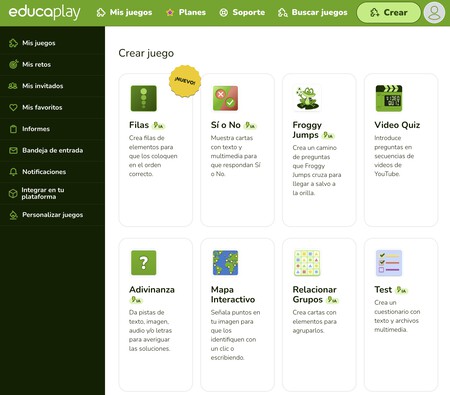

Educaplay is one of the easiest platforms for creating games. After registering and selecting the Create option, you will see a catalog of all the types of games you can make, with a AI symbol next to those using artificial intelligence for assistance.

When you choose a game with the AI symbol, the AI assistant screen will open. Here, all you need to do is describe how you want the game to be. For instance, if it’s a quiz, you just state the subject and grade, but feel free to provide as many details as you want, including specific questions or any necessary adjustments.

The AI will automatically generate a list of questions and answers for you to review, allowing you to finalize the game based on what has been generated. Here, everything generated by the AI should be reviewed, and you can make any changes or corrections you desire.

Create a Game with Wayground

Wayground takes a different approach to game creation, as its AI is limited to quiz-type questions. Upon registering as a teacher, you will click on the Wayground AI button and determine how to create the game.
You will have the option to create questions for an activity from various resources, such as YouTube videos, documents on your computer, worksheets, or question banks from the platform, or directly from content on a website or online article.

When you choose from where you want to obtain the content and paste the link or upload the document, you only need to set your preferences by selecting the number of questions, subject, and grade. Once set, just click the Generate Exam button, and the questions for the game will be generated.