

File Sharing Made Easy: The Rise of LocalSend
In the era of digital connectivity , sharing files across different devices has become integral to our daily lives. Traditionally, systems like Airdrop and Quick Share provided swift file transfers, yet they have significant limitations. Airdrop is exclusive to Apple devices, while Quick Share is confined to the Android and Windows environment. This presents a notable challenge for those using a mix of devices. For instance, transferring files from Android to a Mac or an iPhone to a Windows PC can be cumbersome and inefficient. Thankfully, an open-source , multiplatform solution has made its way to the forefront: LocalSend .
My Experience with File Transfers. Personally, I operate a Windows computer, an Android smartphone, and an iPad. The iPad serves as my design tool and reading device, while the mobile captures everyday moments, primarily through photography. Meanwhile, my PC accommodates most of my professional endeavors. The intricacies of sharing files among these three devices are often overwhelming.
Previously, I relied on applications like Telegram to save files. However, this method felt inefficient, particularly when it came to large files. Transferring hefty documents or videos from my iPad was cumbersome at best.
Airdrop Alternatives. Anyone familiar with the ease of Airdrop between iPhones and Macs appreciates the intuitive interface and speed of transferring files. Is there any alternative that functions seamlessly across platforms? While several options exist, LocalSend stood out due to its user-friendly nature, being free, and its open-source model.
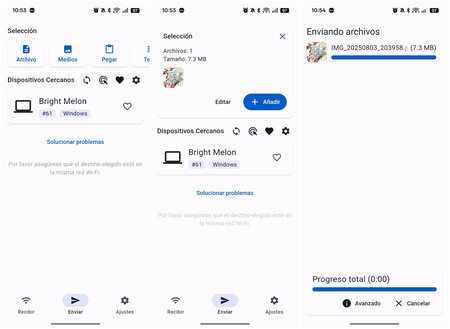
Localsend interface on Android | Image: Xataka
What is LocalSend? LocalSend is an intuitive application that enables users to send files over a local network without needing an Internet connection. It utilizes a REST API and HTTPS encryption to ensure security. Importantly, it connects devices directly without relying on external servers. Developed by Tien Do Nam, the source code is available on GitHub for those interested in exploring its workings.
Operating Mechanism. What surprised me the most about LocalSend was its speed and stability as I transferred files. The app supports various devices and platforms, creating a seamless sharing experience. Notably, it is devoid of advertisements and does not collect user data or share it with third parties, making it a rare gem in today’s app landscape. Users can download LocalSend on multiple platforms: Android, iOS, Windows, Linux, and macOS.
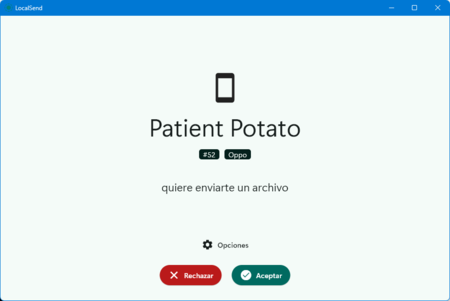
Patient potato (my mobile) sending files to Bright Melon (my PC) | Image: Xataka
There is one limitation: both devices need to be connected to the same Wi-Fi network . While this is typically manageable at home, it poses challenges while on the move. Nevertheless, creating a local Wi-Fi network from your mobile can resolve this issue.
Practical Applications. LocalSend has proven indispensable for transferring large videos recorded for my TikTok account. Previously, I would upload these videos to Amazon Photos, then download them to my PC—an overly convoluted process. Now, I seamlessly transfer heavy design files from my PC to my Android mobile and even share files between my mobile and my partner’s iPhone. If you’re frequently sharing large files across devices, LocalSend can be an invaluable ally .
Images | Xataka
For those interested in more extensive alternatives for sharing large files, check out this resource: How to send large files: 9 free services with unlimited size.