
I am not a photographer. But I enjoy taking photos with my mobile. And, like many people, my approach is quite simple: When what I see on the screen convinces me, I shoot. I do not usually make adjustments like exposure or format. Sometimes the portrait mode is active, and sometimes the night mode. I adjust the focus if necessary, and that’s about it.
The photos I capture with my iPhone 15 Pro Max seem very good to me—more than enough for my needs. However, it’s easy to notice that images taken with a traditional camera have something distinctly different.
Deep down, I took this for granted. Without diving into advanced photography, I thought there wasn’t much more I could get from my mobile device.
Adobe Indigo: The Application That Changed My Mind
The application that transformed my perspective is called Indigo Project. This experimental Adobe Labs tool was developed by two renowned figures in the field: Florian Kainz and Marc Levoy, the latter known for his significant contributions to computational photography, notably in the first Google Pixel.
Indigo is designed to fully utilize the sensors from the iPhone 12 Pro to the 15 Pro Max. It proposes a different approach to mobile photography, one that’s closer to what traditional cameras offer, thanks to a blend of AI algorithms and intelligent processing.
How does it work exactly? Indigo captures not just a single photo but several that it later combines automatically to minimize noise, enhance dynamic range, and produce a cleaner, more realistic image. This complete process happens after simply pressing the shutter button.
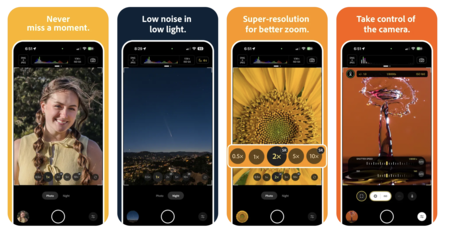
One of Indigo’s strengths is its adaptability for both those who prefer a simple point-and-shoot experience and those seeking to control every aspect of the process. The app allows users to configure manual focus, exposure time, ISO, exposure compensation, and white balance, with tools such as a precision magnifying glass and the option to calibrate color by focusing on a neutral gray object.
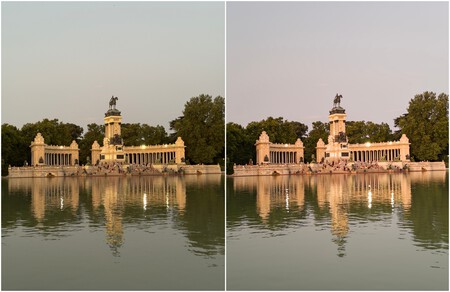
Comparison: Photo captured with the iPhone camera (left) and with Indigo (right)
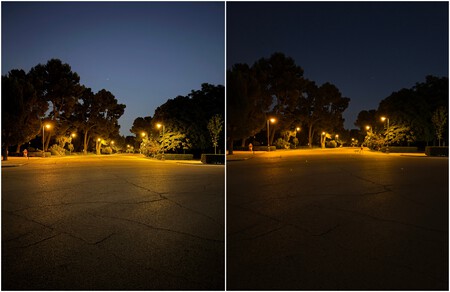
Comparison: Photo captured with the iPhone camera (left) and with Indigo (right)
In this article, I present some comparisons. On the left, images taken with the iPhone camera app. On the right, the same scenes captured with Indigo. At first glance, the difference is remarkable: reduced artificial overexposure, minimal noise, warmer and more natural colors, and skies that look genuine.
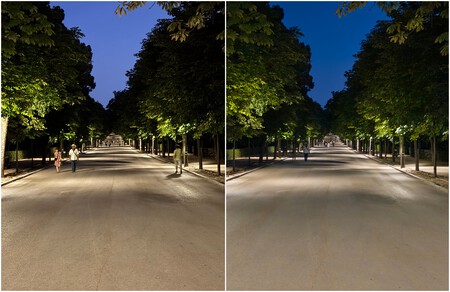
Comparison: Photo captured with the iPhone camera (left) and with Indigo (right)
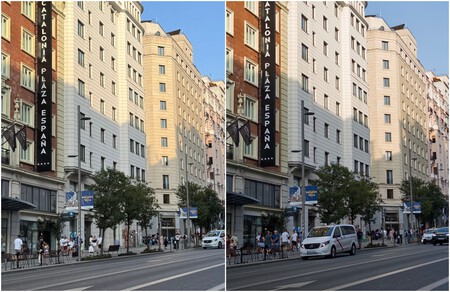
Comparison with cuts: photo captured with the iPhone camera (left) and with Indigo (right)
It’s essential to consider a couple of details. The images take a few seconds to process, and during that time, the phone heats up. There is also an impact on battery consumption if numerous photos are taken in quick succession. While it might not be significant, it’s worth noting.
Since I started using Indigo, my regular camera app has taken a back seat. Not because I have transformed into a professional photographer, but because, for the first time, I feel that the photos I take with my mobile are closer to what I wanted to capture from the beginning.
Images | Xataka
In Xataka | Google Photos was once a place for storing images. Now, Google envisions it as a realm where our photos are “invented.”