
Being able to use ChatGPT in the cloud is fantastic. It is always available, remembers our previous chats, and responds quickly and efficiently. However, relying solely on that service can have disadvantages, such as cost and privacy concerns . This is where an exciting possibility arises: executing local AI models. For example, you can assemble a local ChatGPT .
This capability was recently showcased on Xataka , particularly the trial of the GPT-Oss-20B model , which reportedly runs smoothly with a minimum of 16 GB of memory .
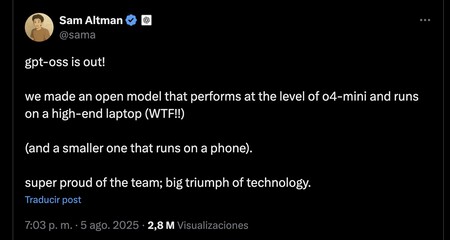
Sam Altman declared that the upper model (120B parameters) could be run on a high-end laptop, while the smaller variant can even execute on a mobile device. However, our experiences confirm that these statements may require further investigation.
First Tests: A Rocky Start
After testing the model for a couple of hours, I found Altman’s assertions somewhat exaggerated. I utilized a Mac Mini M4 with 16 GB of unified memory and had been experimenting with AI models for several months through Ollama , an application designed for easy model downloads and execution.
The process for attempting the OpenAI “small” model was straightforward:
- Install Ollama on my Mac (it was already installed).
- Open Terminal in macOS.
- Execute the command: “OLLAMA RUN GPT-Oss: 20B ” to download and run the model.
Initiating this command starts the download of the model , which is about 13 GB in size, and then the system begins executing it. The loading time to use the model takes a bit, as it requires transferring those 13 GB from the disk to the unified memory of the Mac. After a couple of minutes, I received the green light to interact with the GPT-Oss-20B model .
Excitedly, I took the opportunity to ask some basic questions, such as counting the number of “r’s” in the phrase: “San Roque’s dog has no tail because Ramón Ramírez has cut it.”
Interestingly, GPT-Oss-20B began processing my question and showed its Chain of Thought in a different color. To my satisfaction, it correctly identified the number of “r’s” present in the phrase. However, the response was very slow .
At the time of testing, I had multiple Firefox instances open, each with several tabs, in addition to a Slack session running. This overload proved problematic, as the GPT-Oss-20B model alone requires at least 13 GB of RAM . The additional resource usage caused my system to freeze, necessitating a hard restart.
After rebooting, I tried executing the model again. Despite the slowness of its responses, I was somewhat able to explore its functionalities. However, it quickly became evident that this model is a reasoning model , which means it attempts to provide smarter responses but consequently consumes more resources. This characteristic posed challenges in an already constrained environment.
In the End, A Better Experience
After sharing my experiences on X , several users encouraged me to try again, this time with LM Studio . This tool offers a user-friendly interface that’s more aligned with what ChatGPT provides in a browser.
Post-installation, I once again attempted to use the model, but I encountered a runtime error, stating that there weren’t enough resources. The issue was tied to the graphics memory allocation , which was found to be insufficient. By diving into the application’s configuration settings, I realized the unified graphics memory had been allocated sub-optimally, with 10.67 GB set aside for graphics.
It was crucial to “lighten” the model’s execution process. This involved adjusting the GPU offload , which dictates how many model layers are loaded into the GPU. Reducing it to 10 layers proved to be a beneficial compromise. Other parameters, such as deactivating “Offload KV Cache to GPU Memory” , and decreasing the “evaluation batch size” , also contributed to better performance.
After these tweaks, I successfully loaded the model, which operated much more efficiently and quickly. To my surprise, I encountered a local AI that performed at a level comparable to ChatGPT, responding effectively to questions.
However, when I tasked the model with creating a table of the countries with the most FIFA football championships, it faltered, fabricating years and modifying runner-up numbers, despite being asked to verify the information.
I then explored generating some code in Python for data visualization. While the model doesn’t directly create images, it can generate code that does. After executing the code it provided, I was pleasantly surprised with the accuracy of the graphical representation.
The impression left by the local AI model was surprisingly positive. While it may still make errors, its performance was comparable to more advanced cloud models, making it a significant step in local AI capabilities.
Memory is Everything
The initial hurdles in testing reflect a deeper reality—the statement by Sam Altman and OpenAI has a hidden caveat. While GPT-Oss-120B and GPT-Oss-20B are free to use, they come with hardware prerequisites. To effectively execute these models:
- GPT-Oss-120B : Requires at least 80 GB of memory .
- GPT-Oss-20B : Requires at least 16 GB of memory .
Importantly, this memory should be graphics memory . Unlike PCs that have separate RAM and graphics memory, Apple’s unified memory allows interchangeability between the two, enhancing performance when working with local AI models.
Performance metrics show that Apple’s unified memory is significantly faster and more efficient than conventional RAM found in PCs. Influencing the overall ability to run local AI models smoothly are two main factors: 1) the amount of graphic memory available and 2) the memory bandwidth .
In conclusion, the landscape for implementing local AI models is evolving. There’s potential for accessible, efficient model execution without the connection to cloud servers. By leveraging the right system configurations and infrastructure, the future of local AI looks promising, with the possibility of deploying sophisticated AI on personal devices, enhancing privacy and minimizing costs.