
A recent Google Chrome update has lit the alerts in the technological community. Although these types of patches are usually launched frequently, the version 138.0.7204.183 stands out for its urgent character and for correcting a single high severity failure that affects the multimedia transmission component of the browser.
Given the level of risk, users must ensure the update as soon as possible and restart the browser so that the patch takes effect.
The notice was issued by Srinivas Sista, a member of the Chrome team, through an official publication. In it, it was reported that the corrected vulnerability, identified as CVE-2025-8292 , was reported by an anonymous researcher, who received a reward of 8 thousand dollars for his contribution.

The type of failure, classified as use ‘After Release‘, is known for generating memory corruption errors that can be exploited to execute malicious code remotely .
Google has decided to temporarily limit access to the technical details of this vulnerability , a usual measure that seeks to reduce the chances of malicious actors taking advantage of the failure before most users have updated their browsers.
However, it is known that failures of this type can be used by web pages designed for malicious purposes, facilitating attacks such as malware installation or the theft of confidential information .
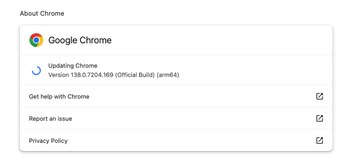
Although the urgent update of Google Chrome will automatically reach user browsers in the next few days or weeks, it is recommended not to wait. To force the installation, just go to the configuration menu, select help and then about Google Chrome. This will begin the download of the new version: 138.0.7204.183/.184 for Windows and Mac, and 138.0.7204.183 for Linux.
However, applying the patch is not enough: it is essential to restart the browser so that the protection is activated. Chrome will keep the tabs open and restore them by restarting, so there is no risk of loss of information. Given this situation, the most prudent is not to postpone the update: a simple action that can avoid serious consequences.
It is important to keep Google Chrome updated to guarantee the safety and proper functioning of the browser. Each update corrects detected failures and reinforces protection against new computer threats that could put the user’s personal information at risk. Besides, the most recent versions incorporate improvements in navigation speed, compatibility with websites, and new functions that optimize the user experience.

Keeping the updated browser also ensures that all extensions and integrated applications work properly, avoiding unexpected errors and blockages. On the other hand, many digital platforms only offer support for current versions, so updating Chrome allows access to all its services without inconvenience.
Not carrying out this process can expose the team to vulnerabilities and performance problems. Therefore, the periodic update of Google Chrome is a simple but essential action to navigate safely and with the best available benefits.
Failing to update Google Chrome can result in various negative repercussions on the navigation and security experience for users. Outdated versions not only limit access to recent functions but also expose devices to different technological risks. Among the main consequences are:
- Greater vulnerability to viruses, malware, and phishing attacks.
- Risk of theft of passwords and personal data.
- Frequent failures, blockages, and decrease in browser speed.
- Incompatibility with modern websites and new applications.
- Impossibility of taking advantage of privacy and performance updates.
- Loss of official technical support.
- Extensions and integrated tools malfunction.
- User experience becomes less fluid and reliable.