
Let’s explain how and what you can send in WhatsApp messages to yourself. This function has been available since 2022, and it is one of the greatly underestimated applications, as it significantly enhances user experience.
We will start the article by explaining how to use this function to have a conversation with yourself. Following that, we’ll present a list of suggestions for optimizing this feature, including a notable function it lacks that keeps it a step behind applications like Telegram.
How to Send Messages to Yourself
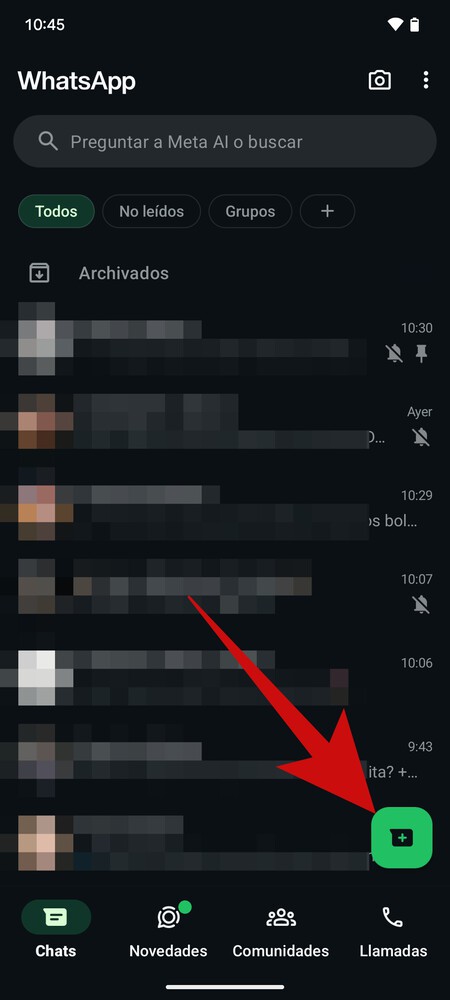
Sending messages to yourself on WhatsApp is very simple. The first step is to go to the main page of the chats, where you need to press the button to start a new chat. This option is available on both Android and iPhone.
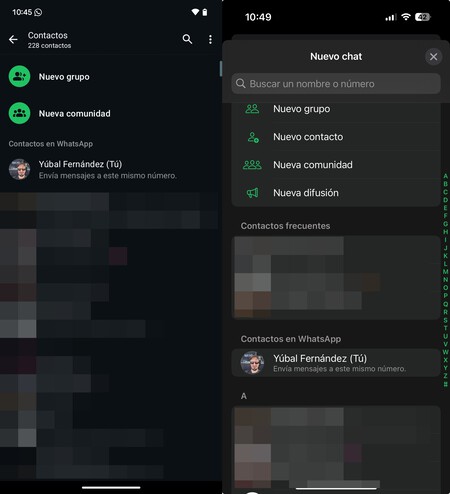
On both Android (left) and iOS (right), when you enter the screen to start a new chat, you will appear as a standout contact. This means you will see your own profile image and contact name. Simply click on it to initiate the conversation. If necessary, it is advisable to save your own number in your phone’s contacts to ensure the app recognizes you.

And that’s all there is to it! You have now started a conversation with yourself, and everything you write in this chat can only be seen by you. You can access this chat from any device where you log in to WhatsApp.

What Can You Do When Sending Messages
So what can you do with this function? There are several benefits to utilizing this feature effectively. Let’s explore some useful ways to maximize this capability.
- Save Links You See Online: If you prefer not to install a third-party app to save links, you can simply send them to your WhatsApp chat. They will be readily accessible whenever you need them.
- Send Files and Photos Between Devices: WhatsApp allows you to operate on multiple devices simultaneously, meaning you can send files, photos, or videos from one device, and they will sync to another. This is especially useful for transferring tickets, important documents, or significant media.
- Send Photos in Original Quality: Don’t forget that you can send images or videos as files, allowing you to transfer them without quality loss between devices.
- Keep Notes: You can jot down thoughts or ideas whenever they come to mind and revisit them later when you’re ready to act.
- Create Reminders: While WhatsApp doesn’t currently allow you to schedule messages, writing notes will ensure they remain visible when you open the app, thus aiding memory.
- Create Lists: For those recommendations you receive—be it movies, series, or books—compile a list to easily reference later. You can also store shopping lists for future purchases.
- Save Jokes and Memes: If someone shares something humorous in a group chat, you can forward it to yourself, preserving the content for future use.
- Remember Passwords: If you find yourself registering on a new website and lacking access to your password manager, you can temporarily jot it down in WhatsApp. However, make sure to delete this message as soon as you can and store it in a more secure location.
- Draft Messages: Before sending important messages to others, consider composing them here first. This way, you can test various formats and refine your message before sending it out.
- Create Stickers: You can use the photos in your chat to create stickers. If you have a specific photo you want to convert but do not wish to share it, send it to yourself first before creating the sticker.
- Use It As Your Diary: You can even utilize this feature to document your daily thoughts, making it your personal digital diary.
By harnessing the capabilities of messaging yourself on WhatsApp, you can efficiently organize your digital life, making it a versatile tool for more than just casual conversations.