

Breaking Boundaries in Mobile Photography: Adobe’s Project Indigo
For quite some time, I have been lugging around my Canon R7 on every trip I take. The reason is simple: I’m utterly fatigued by the photos from the iPhone 16 Pro . This issue is not unique to this particular device. After analyzing numerous high-end cameras, I’ve been arriving at the same conclusion for years: it is futile to improve hardware when the processing remains subpar. But what constitutes “bad” processing? With sensors nearing an inch in size and processors more powerful than those in computers, smartphones should be closer to DSLR capabilities than the photos they took five years ago.
Nearly a decade ago, Google attempted to revolutionize photography with ” computational photography .” In 2016, they launched the Google Pixel , a groundbreaking smartphone that capitalized on artificial intelligence (though back then, that term wasn’t as emphasized) to take photos far superior to its competitors. Marc Levoy led the photography team for the Google Pixel and is now working at Adobe. After several years in silence, he has done what no manufacturer has dared to attempt: push the limits of mobile phone capabilities to reveal its true potential.
Why is this important? Adobe has discreetly announced Project Indigo, an app that applies computational photography principles to the iPhone like never before. Until now, no attempts have been made this radical: the application requires massive resources and demonstrates results that were previously thought impossible in an automatic mode on a phone.
This is a clear indication of how stagnant manufacturers (including Google) have been in mobile photography. No matter how much we spend on a more than €1,000 smartphone, the camera still lags far behind what it could genuinely achieve. Levoy mentions in his publication: “People often complain about the ‘smartphone look’: too bright, low contrast, overly saturated colors, heavy smoothing, and excessive sharpness. This processing comes partly from consumers’ more mainstream preferences . However, when someone spends a fortune on a phone (and we’re doing so more than ever in Europe), this becomes a problem.
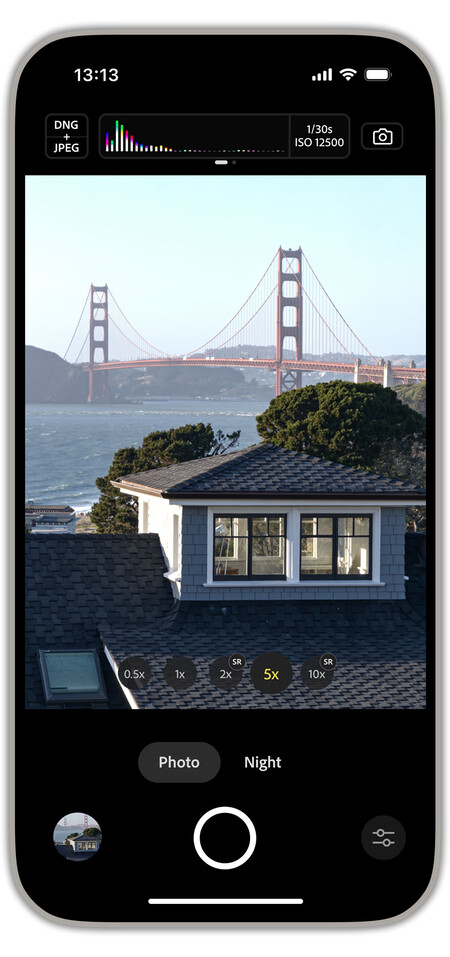
What is Project Indigo? This is a free app developed by Adobe Labs and led by Marc Levoy, among others. Tech enthusiasts will appreciate manual controls, but the average user need not worry—it’s a “normal” app where you just open it, point, and shoot. The key is that when it takes a photo, it is doing something completely different from what Apple typically does.
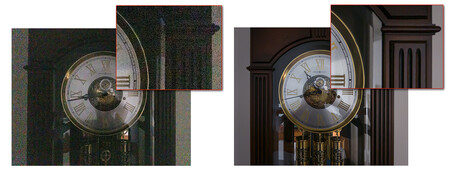
This is what Indigo can achieve with a RAW photo from the iPhone.
Going Full Throttle. Years ago, when Apple talked about Smart HDR , the company demonstrated blends of up to nine images to create a single HDR photo. While the current number remains unknown, Apple’s HDR has not seen substantial improvements in recent years. Levoy clarifies how his app operates: it captures 32 RAW images to create one—yes, 32 images.
Combining 32 frames to produce a single photograph is an astonishing figure. This method reduces noise in shadow areas, minimizes reflections, and decreases overexposure (overly bright areas) by utilizing more underexposed frames. Thanks to the wealth of information collected, textures are better maintained, reducing the need for software noise reduction and minimizing smoothing effects.
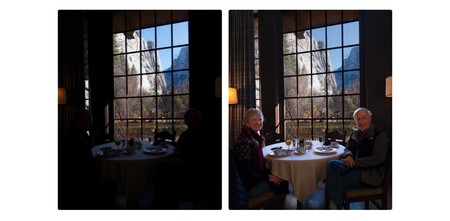
Typical tone mapping | What can be achieved with proper tone mapping.
Going Beyond. Another significant issue in current photography relates to HDR , where shadow areas become flattened (or, conversely, everything gets overexposed) in scenes needing a high dynamic range. To avoid the classic and unsightly forced HDR effect, this app incorporates its own tone mapping (a fundamental process for extracting luminance and color information in HDR content). To put it both simply and clearly, this app processes images in the way Adobe envisions, not as Apple does.


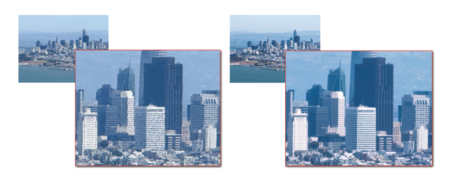
The Importance of Zoom. One of Indigo’s crucial features relates to zoom , a historically weak point for the iPhone. This application silently captures multiple photos continuously while it is open (don’t worry about storage; nothing is saved until you press the shutter). This allows for more detailed images when taking a zoomed photo as they can be combined to create a final shot with enhanced detail.
When to Use This App. Everything looks fantastic with Indigo until you ponder how a mobile can take 32 photos and process them effortlessly. It’s not as straightforward as it appears. This app pushes the iPhone to its limits, and it may cause the device to heat up, especially in summer. However, if you have the time to take a good photo (it takes a few seconds to process), and you want to step away from the typical mobile look, this camera is almost perfect.
Its developers view it as an experimental camera app, and in its initial developmental phase, it will be completely free to use. It is compatible with all iPhones starting from the 12 model and is expected to land on Android soon. Despite being an experimental app, it has promising potential ahead. The developers aim to incorporate customizable looks, computational video features, and enhancements that showcase the true potential of well-applied computational photography.
Image | Xataka
In Xataka | Best iPhone models to buy in 2025 and recommended choices based on budget, preferences, and quality.